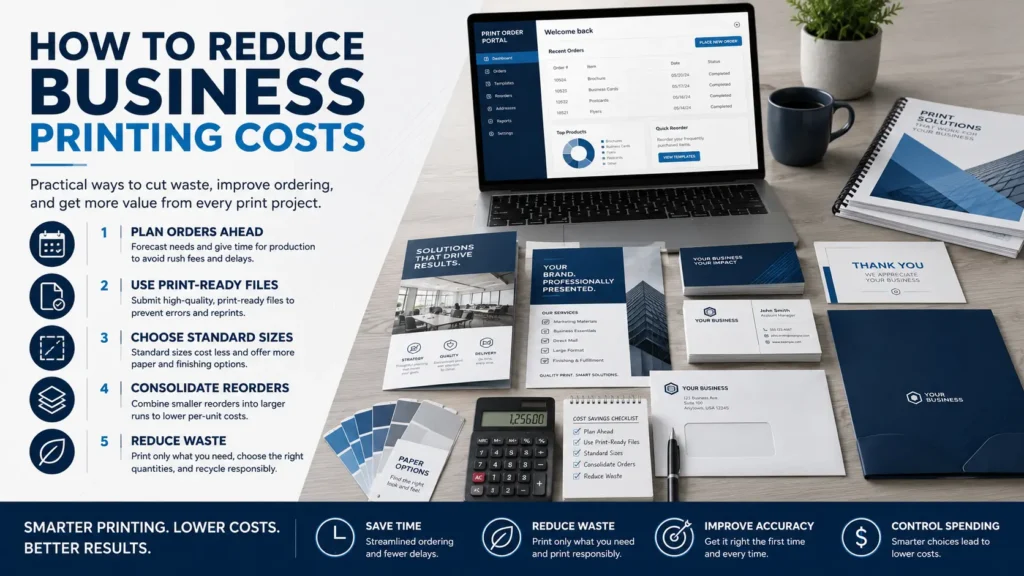
If you want to reduce business printing costs, the goal should not be to make every project as cheap as possible. The smarter goal is to spend money where it actually improves the piece and cut waste where it does not.
Most unnecessary print costs come from a few common places: rushed timelines, unclear specs, last-minute design edits, poor file setup, over-ordering, under-ordering, and paper or finishing choices that are not matched to the job. None of these are unusual. They happen every week in real business environments where people are juggling deadlines, approvals, and changing information.
The good news is that better print planning can protect both your budget and your brand. Here are practical ways small business owners, office managers, and marketing teams can control printing expenses without sacrificing quality.
Start With Clear Goals Before Asking for a Quote
A print quote is only as accurate as the information behind it. If the size, quantity, paper, color, finishing, mailing needs, or delivery details are still unclear, you may receive a quote that changes later. That can make budgeting harder and create frustration for everyone involved.
Before requesting pricing, define what the piece needs to do. Is it a leave-behind sales sheet, an in-store flyer, a direct mail postcard, a presentation packet, or a recurring office form? A short-term promotion may not need the same paper or finishing as a high-value proposal folder.
If your team orders a variety of marketing pieces, it may help to review your broader approach to business printing so you can group similar projects and build repeatable standards.
How to Reduce Business Printing Costs With Better Planning
Rush decisions are one of the easiest ways to spend more than necessary. When a deadline is tight, there may be fewer production options, less time to compare materials, and less room to catch file problems before they affect the schedule.
Build in time for copy review, design approval, proofing, printing, finishing, and delivery or pickup. Exact timing depends on the project, quantity, materials, and current production schedule, so always confirm with the print shop before promising a final deadline internally.
A simple approval checklist can prevent a lot of avoidable cost. Confirm names, dates, phone numbers, URLs, QR codes, disclaimers, logos, and offer details before files go to print. For a more detailed planning process, use this print deadline checklist for artwork, copy, and approvals.
Choose Paper Based on Use, Not Habit
Paper choice has a major effect on both cost and appearance. Heavier or specialty stocks can look great, but they are not automatically the best choice for every project. Sometimes a clean, practical stock is enough. Other times, a premium feel is worth the extra investment.
Think about how the printed piece will be handled. A business card, presentation handout, menu, postcard, and internal form all serve different purposes. A piece that represents your company in a sales meeting may justify a different paper than a one-day event flyer.
Coated, uncoated, text weight, cover weight, opacity, finish, and durability can all affect the result. If you are not sure what fits your project, review this guide to paper choice for printing or ask for recommendations before production. Specs can vary by job, so confirm availability and suitability with your print provider.
Clean File Setup Helps Prevent Reprints
One of the most expensive print problems is paying to fix something after it has already been produced. File issues can lead to delays, reproofs, unexpected design charges, or in the worst case, a reprint.
Common file problems include low-resolution images, missing fonts, incorrect document size, no bleed, text too close to the trim edge, RGB color where print-ready color is needed, and logos pulled from websites instead of original files. These issues are often fixable, but they are much easier to address before the job is on press.
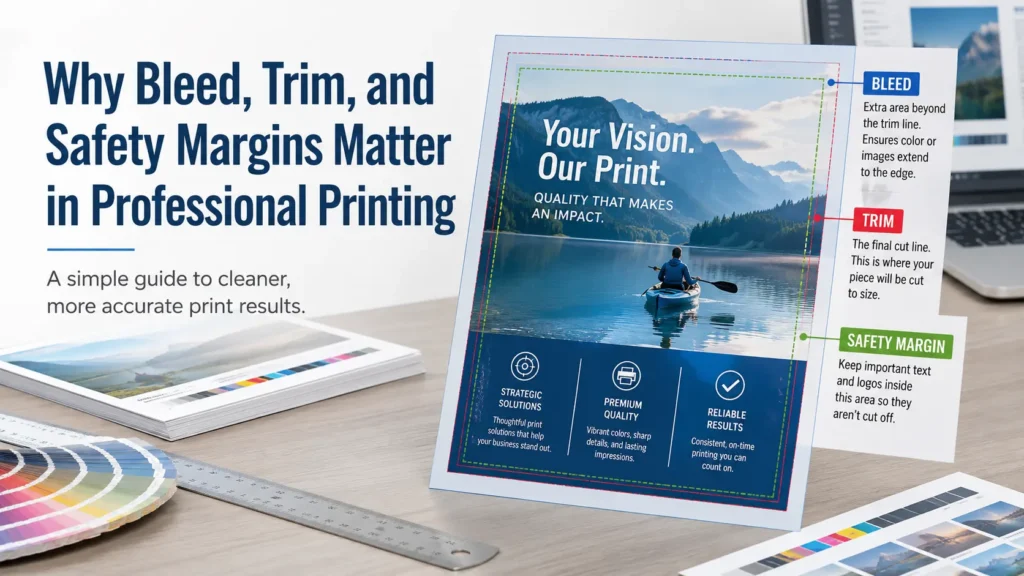
When setting up artwork, review basics like bleed, trim, safety margins, image resolution, color mode, and proofing. Premier Printing Services offers a helpful Prepress Toolkit for file preparation guidance. You can also read more about bleed, trim, and safety margins if your design extends to the edge of the sheet.
File setup mistakes that can increase costs
- Submitting artwork at the wrong size
- Using photos or logos that are too low in resolution
- Forgetting bleed on full-color designs that run to the edge
- Leaving important text too close to the trim line
- Sending multiple file versions with unclear naming
- Making copy changes after proof approval
If you are not confident about your artwork, it is usually better to ask for a file review early. The team at Premier can also help with prepress and graphic design services when a file needs cleanup or design support.
Order the Right Quantity, Not Just the Smallest Quantity
Ordering too few pieces can be just as costly as ordering too many. If you run out and need a second small batch, you may lose efficiency and create another round of setup, proofing, coordination, and delivery.
On the other hand, over-ordering materials with dates, pricing, employee names, seasonal offers, or compliance language can lead to waste. The right quantity depends on how long the piece will stay accurate and how often you use it.
For recurring items like business cards, envelopes, letterhead, flyers, inserts, or branded forms, review usage from the last few months before ordering. If multiple departments order the same piece, centralizing the request can help avoid duplicate small runs.
Batch Similar Projects When You Can
Many businesses order printing one item at a time because that is how needs come up. A flyer is needed Monday. Business cards are requested Wednesday. A postcard gets approved Friday. That approach is common, but it may not be the most efficient.
When possible, group related projects into a planned print run. For example, a sales campaign might include flyers, postcards, presentation sheets, envelopes, and signage. A hiring event might need banners, handouts, table signs, and forms.
Batching does not always guarantee savings, because every job has its own specs, materials, and production requirements. But it can reduce administrative time, simplify approvals, and help your print shop recommend efficient options.
Use Templates and Portals for Recurring Print Needs
If your company regularly orders the same types of materials, templates can reduce design time and prevent brand inconsistencies. This is especially helpful for multi-location businesses, sales teams, franchises, property managers, schools, and organizations with many employees placing orders.
A dedicated ordering process can also reduce back-and-forth emails. Team members can request approved materials without rebuilding files from scratch each time. If your business has repeat print needs, learn how small businesses benefit from a dedicated portal or explore options for multi-location business printing.
Be Selective With Finishing Options
Finishing can make a printed piece more useful, durable, or polished. Folding, scoring, binding, drilling, laminating, special coatings, and other options can all support a specific purpose. They can also add cost when they are not needed.
Ask what the finishing choice is doing for the project. Does it make the piece easier to use? Does it protect it from handling? Does it help the recipient understand or keep the information? If the answer is yes, it may be worth it. If it is only being added out of habit, it may be a place to simplify.
This is where a short conversation with your print shop can help. Sometimes a small adjustment to size, fold, paper, or format can produce a professional result without unnecessary complexity.
Proof Carefully Before Giving Approval
Proofing is not just a formality. It is one of the last opportunities to catch errors before production. A proof should be reviewed by someone who understands the content, not only someone checking the look of the design.
Check spelling, phone numbers, addresses, dates, QR codes, website links, legal language, pricing, image placement, page order, and final size. If multiple people need to approve the file, decide who has final authority before the proof arrives.
For larger campaigns, it helps to assign one person to collect edits instead of sending conflicting feedback from several departments. Fewer unclear revisions can keep the project moving and reduce the chance of mistakes.
Know When Cheap Printing Can Cost More
There is nothing wrong with looking for affordable business printing. The problem comes when cost is reduced in a way that creates poor readability, weak color, flimsy materials, missed deadlines, or brand inconsistency.
A low-cost piece that fails to communicate clearly is not really saving money. Neither is a rushed job that has to be reprinted because the file was not checked. The best value is usually found by matching the specs to the business purpose, not by choosing the lowest option every time.
If the printed piece will be seen by customers, prospects, donors, tenants, patients, or partners, think carefully before cutting corners that affect trust. For high-visibility materials, a slightly better paper, cleaner design, or proper prepress review can protect the impression you are trying to make.
FAQ: Reducing Business Printing Costs
What is the easiest way to lower business printing costs?
Start by improving planning and proofing. Clear specs, clean files, and early approvals can help prevent rush charges, rework, and reprints. Paper and quantity choices also have a big impact.
Can I save money by printing a smaller quantity?
Sometimes, but not always. A smaller quantity may reduce total spend, but if you reorder soon after, the overall cost and administrative time may be higher. Estimate realistic usage before deciding.
Does better paper always mean better quality?
No. Better quality means the paper fits the purpose. Some pieces need a heavier or more polished stock, while others work well on a simpler option. Ask your print shop what makes sense for the job.
Should I use a template for repeat print orders?
Yes, if you order similar materials often. Templates can reduce design time, improve brand consistency, and make ordering easier for teams.
Reduce Business Printing Costs Without Guessing
The best way to reduce business printing costs is to make informed choices before production begins. Plan ahead, submit clean files, choose paper with intention, proof carefully, and ask questions when a spec is unclear.
You do not have to figure out every detail alone. A good print partner can help you compare practical options, avoid common file issues, and choose materials that fit both your budget and your brand.
For more information or help planning your next print project, contact Premier Printing Services.